Children's voice recordings count as personal information under COPPA, and most services need verifiable parental consent to collect them. The one exception is narrow: audio used only to fulfill an immediate request, then deleted right away. Right now, open the parental controls on any speaker, app, or headset your child talks to and check what's being saved.
TL;DR:
- Parents should turn off voice and audio activity recordings on all child's devices, as these can be retained and used for purposes beyond immediate commands.
- Verifiable parental consent is required before collecting a child's voice recordings unless the audio is immediately deleted after being used for a single request.
- Reviewing and deleting stored voice history regularly, especially after holidays when devices are installed or updated, reduces the risk of data accumulation.
- Privacy policies often lack clear retention limits or explicit consent requirements, so parents should focus on specific terms like "retain," "train," and "third parties" for red flags.
- Using private podcast feeds instead of always-listening devices offers a lower-risk alternative for sharing audio content with children.
Table of Contents
- Practical Parental Checklist: Priority Steps to Secure Your Child's Audio Privacy Now
- How COPPA Treats Audio Recordings and What That Means for Parents
- Device and Platform Settings to Check (Concrete Examples You Can Follow)
- How to Read a Privacy Policy Fast and Spot Audio-Specific Red Flags
- Durable Risk-Reduction Strategies and Alternatives Parents Can Adopt
- Why Private Podcast Feeds Are a Lower-Risk Option for Kids' Audio
- Where to Find Official Guidance and Report Problems
- The Gap Between Privacy Policies and What Parents Actually Check
- Sources
Practical Parental Checklist: Priority Steps to Secure Your Child's Audio Privacy Now
Most parents don't discover their child's voice history exists until they go looking for it. Here's the order that actually matters, based on where the biggest gaps tend to sit.
- Switch to a child-specific account wherever one exists. Kid profiles on Alexa, Google, and similar platforms come with tighter defaults than adult accounts, and most parental controls only activate once that profile is set up.
- Find the voice and audio activity toggle and turn it off. Look for settings labeled something like "Include voice & audio activity" or "Voice history." Leaving this on means every recorded snippet sits in a company's server until you manually remove it.
- Review the saved voice history, then delete it. Most platforms let you play back or read transcripts of past requests. Set a recurring date, such as once every few weeks, to check and clear this out.
- Turn off "remember" and personalization features. These are the settings that let a device recall a child's name, school, or address across sessions. Convenience for the device usually means more stored personal data.
- Set household rules about where devices listen. Keep voice assistants out of bedrooms and bathrooms, manage wake words so a device doesn't activate on a nickname, and mute or unplug smart speakers when your child has friends over whose parents haven't consented to being recorded.
Pro Tip: Do this audit right after a holiday or birthday. New smart toys and speakers arrive with factory default settings, which almost always favor data collection over privacy.
How COPPA Treats Audio Recordings and What That Means for Parents
The FTC's policy statement on COPPA classifies audio files containing a child's voice as personal information, the same legal category as a home address or a photo. That means any service directed at children under 13 generally needs verifiable parental consent before it can collect that audio at all.
There's one carve-out, and it's tighter than most parents assume. The FTC will not require consent when audio is captured solely to convert speech to text, used only to carry out that one command, and then deleted immediately without being stored or reused for anything else, including advertising or product improvement. The FTC's guidance on voice recordings makes clear this exception disappears the moment a company holds onto that audio for any secondary purpose. If a device keeps a transcript "to improve the assistant" or "personalize responses," that's no longer covered by the exception, and consent rules kick back in.
Companies operating under COPPA also owe parents specific disclosures: how long recordings are retained, whether they're shared with third parties, and how deletion actually works. Parents, in turn, have real rights here, not just polite requests. According to the FTC's consumer guidance, you can demand a plain-language notice of what's collected, review the specific information gathered about your child, delete it, and revoke consent entirely going forward. Few parents exercise these rights because few know they exist. The law gives you more leverage than most privacy settings screens suggest.
Device and Platform Settings to Check (Concrete Examples You Can Follow)
Every major voice platform buries its audio controls a few taps deep, and the paths differ enough that "check your settings" isn't useful advice on its own. Here's where to actually look.
- Google Assistant: Under your Google Account's Data & Privacy section, find "Web & App Activity" and look for the toggle labeled "Include voice & audio activity." Turning this off stops new recordings from being saved. For child accounts managed through Family Link, voice and audio activity is usually off by default, but it's worth confirming rather than assuming.
- Amazon Alexa: Kid profiles (through Amazon Kids) let you view and delete voice history separately from the household account. Go to the Alexa app's Privacy Settings to review recordings, and check "Skills" your child has enabled, since third-party skills operate under their own privacy terms, not Amazon's. A TechCrunch investigation into Echo Dot Kids found many kid-oriented skills lacked basic privacy policies and made deletion unnecessarily hard, so don't assume "made for kids" means privacy-safe.
- Smart toys and kids' headphones: Check whether the companion app requires explicit consent before activating a microphone, and look for a visible recording toggle rather than one buried in settings. Read firmware update notes; a toy that gains new "listening" features after an update should trigger a fresh privacy review on your end.
- Requesting deletion: If a platform's in-app deletion tool seems incomplete, contact the company directly and ask for confirmation that transcripts, not just audio files, were removed. Enforcement history backs up why this matters: the FTC and DOJ took action against Amazon for keeping children's Alexa voice recordings indefinitely, well past what parents were told.
Pro Tip: If a "delete" button only removes audio playback but not the underlying transcript, that's a sign the deletion isn't complete. Ask the company directly and get it in writing.
How to Read a Privacy Policy Fast and Spot Audio-Specific Red Flags
You don't need to read the whole document. Use your browser's find function and search for a handful of terms: "voice recordings," "transcripts," "retain," "third parties," "train," and "advertising." Where those words land tells you almost everything.
Watch for these warning signs:
- Retention periods described as indefinite, or no retention period stated at all.
- Language allowing audio to be used for advertising or to "train" or "improve" models without a separate, explicit consent step.
- Vague references to sharing data with "partners" or "affiliates" without naming who they are or why.
- No clear, self-service way to delete a child's recorded data.
And here's what a genuinely privacy-conscious service looks like on paper: an explicit "no ads, no tracking" commitment, a short and specific retention window (30 days, not "as needed"), a parent-facing dashboard for reviewing what's stored, and a real human contact for deletion requests. Privacy-by-design principles for children's products treat these as baseline expectations, not premium features, which tells you something about how low the bar currently sits across the industry.
Durable Risk-Reduction Strategies and Alternatives Parents Can Adopt
One-time settings changes help, but audio data has a way of accumulating again within weeks. Building a few habits into your routine matters more than any single fix.
- Choose subscription services that state plainly they don't store raw audio or sell it for advertising. A privacy-by-design promise, "no ads, no tracking," backed by a specific retention policy, is a much stronger signal than a generic "we care about your privacy" line.
- Turn off personalization features anywhere they exist, then rotate through saved voice items every few months, deleting what's accumulated since your last pass.
- Mute microphones on devices that aren't actively in use. Most smart speakers have a physical mute button. Use it during playdates, sleepovers, or whenever a device sits idle in a shared space.
- Set up guest accounts for visiting children so their voices don't get folded into your household's stored data, and manage networked toys the same way, don't leave them on default settings just because a child is excited to use them immediately.
- Talk to older kids directly about what not to say out loud to a device, the same way you'd coach them about not sharing personal details online. A quick quarterly account audit, checking connected devices, saved data, and app permissions, catches most problems before they compound.
Pro Tip: Connected toys sometimes carry device identifiers or WiFi chips that persist even when a toy is marketed as "offline capable." Check the app's permission list and any available data flow documentation before assuming a toy isn't collecting anything.
Why Private Podcast Feeds Are a Lower-Risk Option for Kids' Audio
A private podcast feed works differently from an always-listening smart speaker: it delivers audio content to your child without a microphone sitting open in the room, and access runs through a link only you control, not an open account any household guest could trigger.
That distinction matters for the kind of data trail it leaves behind. There's no wake word listening for activation, no voice command history building up, and no third-party skill ecosystem attached to it. Some services deliver personalized superhero podcasts this way, through a private feed sent to a parental email each week, with the parent controlling the account rather than the child.
When you're evaluating any private-feed audio service, look for:
- A private feed rather than a public podcast listing, so episodes aren't discoverable outside your household.
- Parental account control over the subscription.
- No behavioral advertising built into the delivery model.
- A clear answer, in writing, about what happens to your data if you cancel.
Before subscribing to any children's audio product, ask directly how recordings or personal details are stored, and for how long. A service that answers specifically, not just "we take privacy seriously", is the one worth trusting with your child's name and voice. You can read more about how private feeds compare to public ones in our breakdown of private versus public podcast delivery.
Where to Find Official Guidance and Report Problems
- FTC guidance on COPPA and voice recordings for the official rules.
- Protecting your child's privacy online to file a complaint or learn your rights.
- Strengthening children's online voice privacy for policy context on gaps in current law.
The Gap Between Privacy Policies and What Parents Actually Check
Most advice on this topic stops at "read the privacy policy," which is technically correct and practically useless. Nobody's reading a 4,000 word document before letting their kid talk to a smart speaker on Christmas morning. The more honest fix is narrower: know the four or five phrases that actually matter, "retain," "third parties," "train," and check for them.
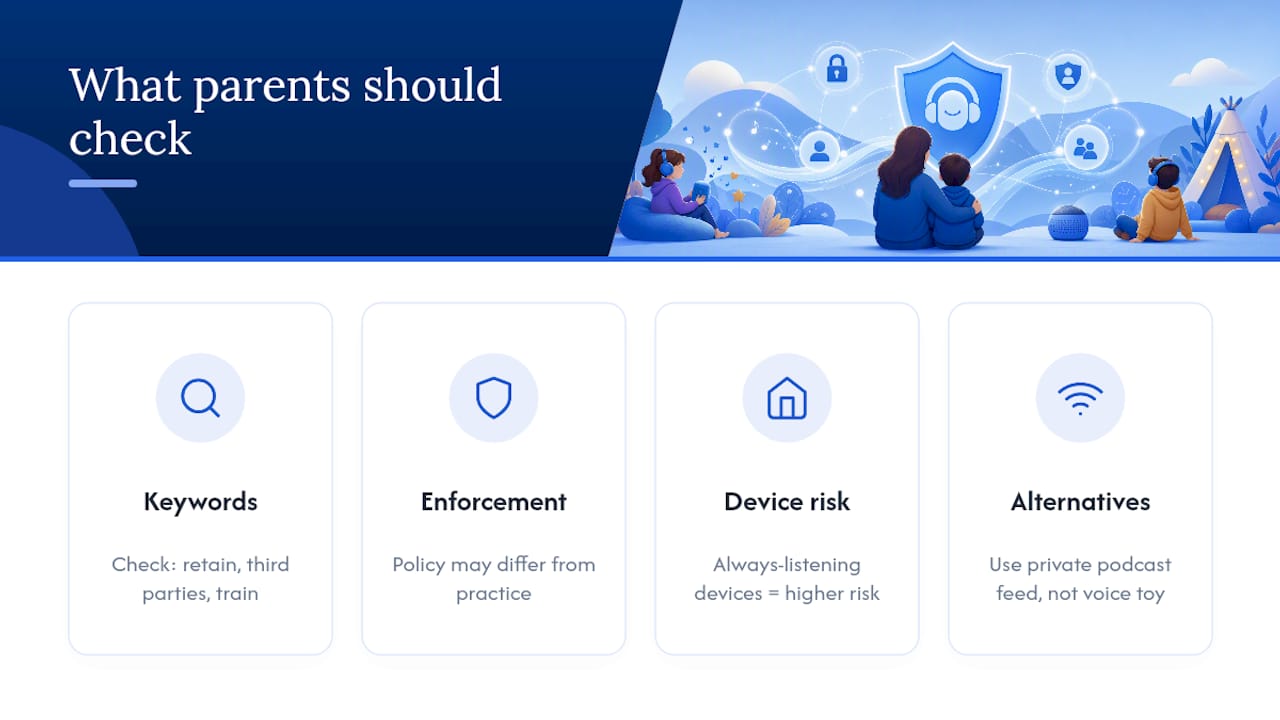
The bigger blind spot is enforcement, not disclosure. Companies have faced real FTC and DOJ action for keeping children's voice recordings indefinitely after telling parents otherwise. Policy on paper and practice in the data center are not the same thing, and no amount of reading a privacy policy catches that gap.
If you take one thing from all of this, prioritize architecture over settings. A device that's always listening will always carry more risk than one that isn't, regardless of how many toggles you switch off. Choosing tools that simply collect less, like a private podcast feed instead of a networked, voice-activated toy, does more for your child's privacy than any single settings change ever will.
— JG
This article is general information, not a substitute for advice from a qualified lawyer. Consult a qualified legal professional about your own circumstances before acting on anything here.
Sources
- FTC provides additional guidance on COPPA and voice recordings
- FTC policy statement on COPPA and audio recordings
- Protecting your child's privacy online (FTC consumer guidance)
- Strengthening children's online voice privacy (FAS)