If your child's private feed link isn't working, the fastest fix is logging into your account to copy the private RSS link directly, or asking support to resend it to your email. Check that your subscription is active first: an expired plan is the single most common reason a private feed stops delivering new episodes.
TL;DR:
- Most private feed issues stem from expired subscriptions or outdated links, making it essential to verify your plan is active before troubleshooting.
- The private RSS link is usually found in the initial setup email or on the account management page, not buried deep within app settings.
- Refreshing the feed, removing old entries, and re-adding the new link often resolve common app-based syncing problems within minutes.
- Support can quickly resend or regenerate your private feed link if self-service options are unavailable, requiring account details and recent episode info.
- Sharing your private link is risky because it contains a unique token that can trigger a security reset, so direct device addition or support-authorized sharing is safer.
Table of Contents
- Where to Find Your Private Podcast Link First
- Try These Fixes Before You Contact Support
- How to Request a Resend the Right Way
- Why Your Private Link Is Unique, and What Happens if You Share It
- What to Send Support and How Long It Takes
- How We Handle Resends at G45-hero-cast
- Get Your Link Resent Today
- Platform Help Pages Worth Bookmarking
- Sources
- FAQ
Where to Find Your Private Podcast Link First
Before you contact anyone, check the two places most subscribers overlook. The private feed link almost always lives in your original confirmation email, and it may show up again in the weekly Sunday delivery email under a "Set up podcast" or similar link. Search your inbox for the subject line from your first order. That single email usually solves the problem in under a minute.
If the email search comes up empty, log into your subscriber account and look in these spots:
- My Account or Manage Subscription, where most providers store your active plan details
- A tab labeled Private Podcast or Private RSS, which typically shows a copyable URL
- Mobile account screens with buttons like "Set Up Podcast," "Add to Podcast App," or "Copy Link"
Spotify's own creator documentation confirms this is standard practice across the industry: your private RSS feed link is normally issued through your confirmation email or account dashboard, not buried in app settings. Substack follows the same pattern, placing the private feed URL on the manage subscription page or in the original setup email. If your provider works similarly, checking these two spots should be your first move every time, not just once.
Try These Fixes Before You Contact Support
Most "missing episode" problems are app issues, not account issues, and you can usually solve them yourself in a few minutes.
- Confirm your subscription is active. An expired or lapsed plan is a leading cause of private feeds going quiet, according to Pocket Casts support documentation. Check your billing status before touching your podcast app.
- Remove the old feed entry. Delete the existing private podcast from your app rather than trying to update it in place.
- Add the new link using "Add by URL." Most apps have a specific option for this, often labeled "Add Show by URL" or "Add by URL," separate from the regular search bar.
- Refresh the feed manually. Pull down on the podcast screen inside the app to force a refresh, then wait a minute before checking again.
- Restart or reinstall the app if episodes still don't appear after refreshing.
- Switch apps if needed. Not every podcast app handles external private RSS feeds the same way. Apple Podcasts, for instance, manages subscriptions in-app and may not expose a URL the way apps like Overcast or Pocket Casts do.
Patreon's support team gives nearly identical advice to its members: unsubscribe, resubscribe with a regenerated link, and refresh the feed if episodes stop syncing. That remove-and-re-add sequence resolves the majority of access complaints before anyone needs to contact a human.
Pro Tip: Copy the entire link, including the long string of letters and numbers at the end. That string is your unique access token, and copying only part of it is the number one cause of "feed not found" errors.
How to Request a Resend the Right Way
If self-service doesn't turn up the link, look for an in-account option first. Many providers include a button labeled "Resend Link" or "Email Me My Link" right inside the account dashboard, which skips the support queue entirely.
If that option isn't available, or you don't see it, email support directly or use the site's contact form. Include the following so the agent can act on the first reply instead of asking follow-up questions:
- The email address on the subscription
- The name on the account
- Your order number or subscription ID, if you have it handy
- Your child's name (helpful since episodes are personalized)
- The device and app you're using (iPhone with Overcast, Android with Pocket Casts, etc.)
- A clear line stating you need the private RSS feed URL resent
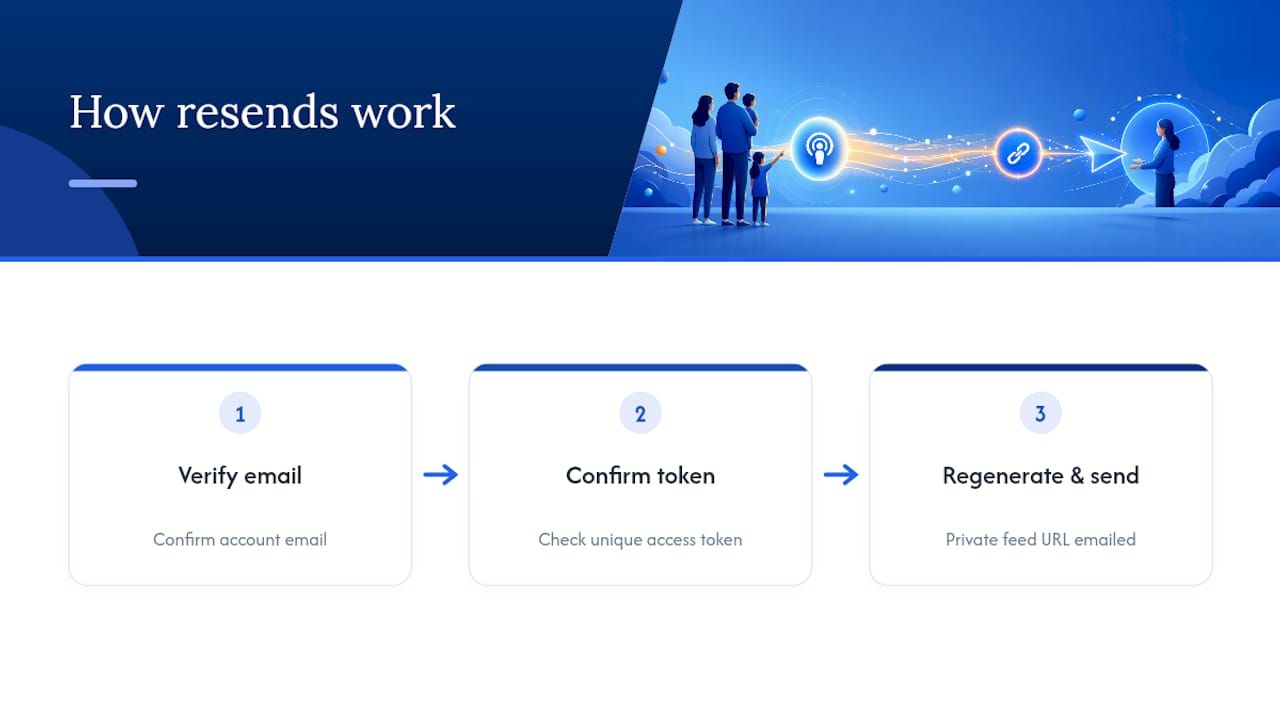
Support will typically either regenerate a fresh access token or simply resend the existing link to your email on file. Once you receive it, give your app a few minutes to sync after you re-add the feed. Some providers, as noted in community guidance on private podcast access, build in a self-service resend option for exactly this situation, so it's always worth checking before emailing.
Why Your Private Link Is Unique, and What Happens if You Share It
Your private podcast link isn't just a web address. It carries an authorization token tied specifically to your subscriber account, which is why it looks like a long jumble of letters and numbers rather than a clean URL. Forwarding that link to a friend, posting it in a group chat, or pasting it somewhere public can trigger an automatic security reset on some platforms, cutting off your own access in the process.
If you want another family member to listen, here are safer options:
- Copy the link privately and add it directly to their device yourself
- Ask support whether they can authorize an additional device on your existing subscription
- Have that person log into the shared account rather than passing around the raw link
If a link ever does get regenerated for security reasons, you'll need to remove the old feed and re-add the new one in every app where your child listens.
What to Send Support and How Long It Takes
A clean, complete request gets you a working link faster and usually avoids a second email. Gather this before you reach out:
- Email address on file
- Name on the account
- Subscription ID or order number
- Your child's name
- The date of the last episode you actually received
- Device and app in use
Send that in one message along with a short line asking for the private RSS feed URL to be resent. Once support replies, remove the old feed entry in your app, add the new URL, and refresh. Apps typically parse a newly added feed within a few minutes, though it can occasionally take a bit longer depending on the app. If access still doesn't work after that, the two most common culprits support will check are expired billing on the subscription or a mismatch between the email you used to sign up and the one you're emailing from now.
How We Handle Resends at G45-hero-cast
G45-hero-cast builds a new personalized superhero episode for your child every week and delivers it straight to a private podcast feed tied to your subscription. When a link goes missing or an app stops pulling new episodes, our support team can regenerate or resend that private feed URL directly to the email on your account.
Because each feed link carries an access token unique to your subscription, we verify the email and account details before issuing a replacement. That step protects your child's private feed from being accessed by anyone outside your household, while still keeping the resend process quick once we've confirmed it's really you.
Get Your Link Resent Today
G45-hero-cast is built specifically for parents and grandparents managing a private feed for a child's weekly episodes, not general podcast troubleshooting. That means our support team already knows exactly what a "resend my link" request looks like and can act on it fast, without you having to explain what a private RSS feed even is.
If your child's feed has gone quiet, log into your account at G45-hero-cast to check your subscription status and copy your private link directly, or reach out through the same page to have it resent to your email. Both the Bedtime Standard plan and the Grandparent Gift plan include this kind of support, so whether you're the subscriber or you gifted the subscription to your grandchild, the same account page gets you back to weekly episodes.
Platform Help Pages Worth Bookmarking
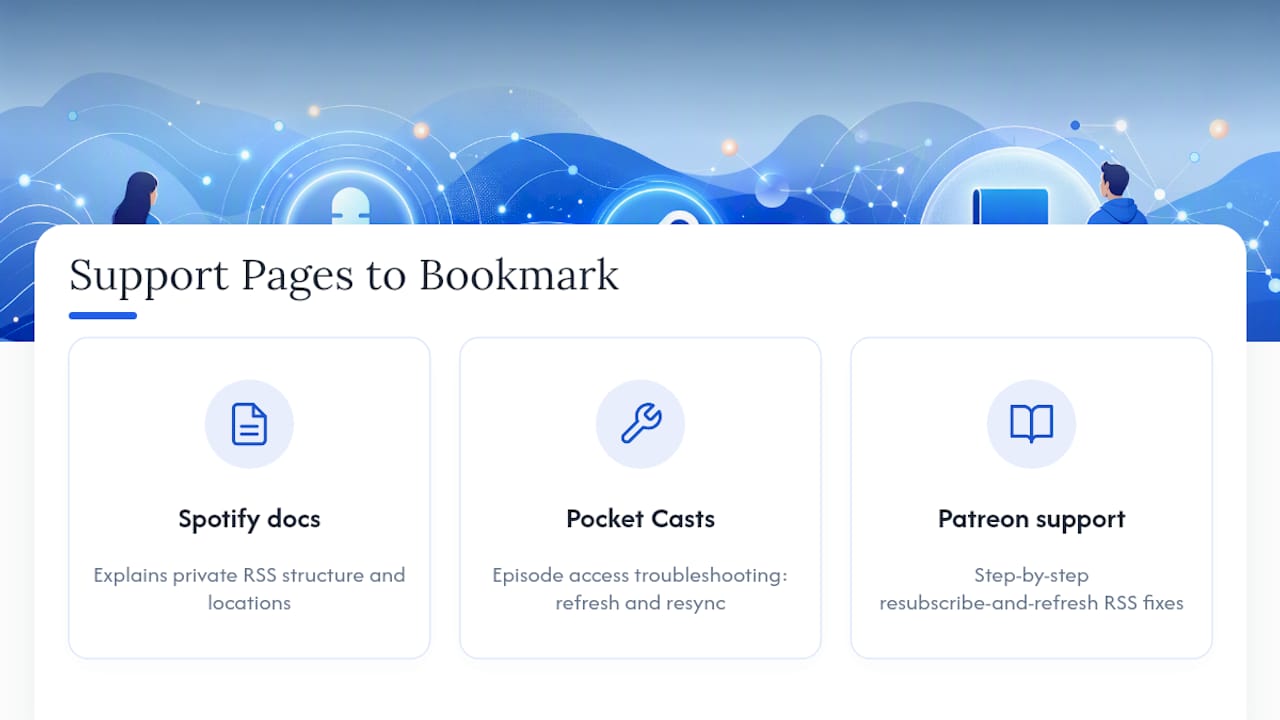
If your issue traces back to the podcast app itself rather than your account, a few official support pages cover the ground well. Spotify's creator documentation on private RSS feeds explains how private feeds are structured and where they typically live. Pocket Casts maintains a dedicated episode access troubleshooting page covering refresh and resync issues. Patreon's member support article on RSS feed fixes walks through the resubscribe-and-refresh sequence in more detail if you want the step-by-step version.
Sources
- Episode Access Issues – Pocket Casts Support
- How to fix issues with your audio RSS feed (Member)
- How do I listen to episodes on my podcast app
- Get the Private Podcast on Your Phone/Device
FAQ
Why isn't my child's podcast link working anymore?
The most common cause is an expired or lapsed subscription, which stops new episodes from delivering even if the app still shows old ones. The second most common cause is an app that's still pointed at an old, removed feed and needs the link re-added fresh.
How do I resend a private podcast link to myself?
Check your account dashboard first for a "Resend Link" or "Email Me My Link" button, since many providers include this option. If you don't see one, contact support with your account email and subscription ID and ask them to resend the private RSS feed URL.
Can I share my private podcast link with another family member?
You can, but it's risky, since the link contains a token tied to your specific account and sharing it can trigger an automatic security reset. It's safer to add the feed directly to their device yourself or ask support about authorizing an additional device.
How much does a G45-hero-cast subscription cost?
The Bedtime Standard plan runs $99 per month, and the Grandparent Gift plan is $999 per year. Both include weekly personalized superhero episodes delivered to a private podcast feed.
How long does it take to get a new link after contacting support?
Once support resends or regenerates your link, most podcast apps parse a newly added feed within a few minutes. If episodes still don't show up after that, removing the old feed entry and re-adding the new URL usually clears it up.