
Spotify does not let you paste a private, password-protected RSS feed into its app. That's the short answer, and it trips up a lot of creators who assume podcast platforms all work the same way. Spotify only unlocks private shows through two official routes: a hosting platform that has built out Spotify Open Access, or Spotify's own paid podcast subscriptions with account linking.
If you're a creator trying to figure out how to create a private podcast that plays inside Spotify, you need your host to support one of those two paths. If you're a listener who got an invite and can't find where to paste the feed, stop looking for that field. It doesn't exist.
- Creators: Pick a host with Spotify Open Access support, or use Spotify's paid subscription tools.
- Listeners: Expect an access code or activation link, not a feed URL to copy and paste.
- Everyone else: Manual private RSS still works fine in apps like Apple Podcasts or Overcast. It just doesn't work in Spotify.
Key Takeaways
Spotify unlocks private podcasts only through host-side Open Access integration or its own paid subscription system, never through manual RSS entry.
| Point | Details |
|---|---|
| No manual RSS on Spotify | Spotify blocks manual paste-in of private RSS feeds; only Open Access or paid subscriptions work. |
| Two supported creator routes | Use a host with Spotify Open Access, or enable Spotify's paid podcast subscriptions directly. |
| Listener activation is code-based | Listeners click an activation link or enter a code, then link their Spotify account to unlock the show. |
| Metadata can leak even when locked | Titles and descriptions may be indexed even when audio stays locked, so keep sensitive details out of them. |
| G45-hero-cast prioritizes hidden feeds | G45-hero-cast delivers weekly personalized kids' episodes to private feeds and enables Spotify only when it won't expose a child's personal details. |
Table of Contents
- Private Podcast Spotify Access: How the System Actually Works
- How Do You Enable Spotify Access for a Private Show?
- How Do Listeners Activate a Private Podcast on Spotify?
- Why Is My Private Podcast Locked or Showing an Error on Spotify?
- Should Your Private Show Be Hidden or Just Locked?
- How We Handle Private Feeds at G45-hero-cast
- What Creators Get Wrong About Spotify and Privacy
- Give Your Child a Private Show Worth Protecting
- Frequently Asked Questions
- Sources
Private Podcast Spotify Access: How the System Actually Works
Spotify treats private audio as a permissions problem, not a URL problem. That distinction explains almost every piece of confusion people run into.
Spotify Open Access is the integration layer hosting platforms build so a private show can be authenticated inside Spotify's app. Instead of a feed URL, the listener gets an access code or an activation link. Clicking it triggers an account-linking handshake between the host and Spotify, and only after that handshake succeeds does the episode unlock.
Paid subscriptions work differently. A listener subscribes and pays through Spotify directly, and Spotify itself manages the unlock. In this flow, the host may still hand you a private RSS feed for use in other apps, but inside Spotify, the content activates through subscription status, not a feed.
Behind both flows sits a sandbox mode and special RSS fields (Spotify calls one spotify:namespace) that let developers test private shows before they go live. Spotify's Open Access developer documentation lays out how the backend checks entitlement before it ever streams audio.
- No manual feed entry, ever, for private shows.
- Every unlock requires an authenticated handshake or a Spotify-managed subscription.
- As of early 2026, only a limited number of hosting platforms have built Open Access support, so this is not yet a universal feature across podcast hosts.
How Do You Enable Spotify Access for a Private Show?
Getting a private show working on Spotify comes down to five decisions, made roughly in this order.
- Choose a host that supports Spotify Open Access or Spotify's paid subscription tools. Not every hosting platform has built this. Confirm it before you commit to a plan, because switching hosts later means re-onboarding every subscriber.
- Decide on visibility. You can keep the show fully hidden, or let it appear in search with a lock icon that signals "subscribers only." Pick based on how private the content needs to be, not just what's default.
- Submit for Open Access or turn on paid subscriptions inside your host's dashboard. If your host ingests episodes via RSS before submission, make sure your feed matches Spotify's delivery spec, correct namespace fields included.
- Issue access codes or invite links, and write down your revocation process before you need it. Someone will eventually ask for a refund or cancel mid month, and you want a clean way to cut off access.
- Test everything in sandbox mode before your first real subscriber tries it. This is where most avoidable support tickets get caught early.
Pro Tip: Keep episode metadata (titles, show notes) boring and generic on purpose. If your show ever needs to switch between hidden and searchable-with-lock visibility, you don't want a subscriber's name or a sensitive topic sitting in a title that got indexed months ago.
One operational detail worth knowing: when Open Access handles the integration, revocation syncs back automatically once a subscription lapses. You're not manually pulling access for every canceled subscriber.
How Do Listeners Activate a Private Podcast on Spotify?
If you received an invite to a private show, the activation flow is short but has to happen in order.
- Open the invitation you received — usually an email with an access code or a direct activation link.
- Click the activation link, or enter the access code where prompted on the host's activation page.
- Link your Spotify account when asked. This is the step that actually unlocks the content; skipping it or linking the wrong account is the most common failure point.
- Find the show in your Spotify library, same as any other podcast you follow.
- Check download settings if you want offline listening. Playback works on free accounts, but offline downloads generally require Spotify Premium.
If the show never gives you a Spotify option at all, the host simply hasn't built that integration. Your fallback is a private RSS feed used in a podcast app that supports manual feed entry, which is most of them besides Spotify.
Before assuming something's broken, run a quick check: are you signed into the same Spotify account you used during activation? Is your subscription actually active? If either is off, that's your fix before you touch anything else.
Why Is My Private Podcast Locked or Showing an Error on Spotify?
Most access problems trace back to one of four causes, and they're worth checking in this order because the first two solve the majority of tickets.
- Locked icon won't go away after activation. Log out of Spotify completely, log back in, and confirm you used the same email during activation that your Spotify account uses. A mismatch here is the number one cause.
- You're seeing a 409 error during linking. This usually means a stale link exists between your account and the host. Unlink through the content access endpoints, then repeat the activation sequence from the start rather than retrying the same broken link.
- No Spotify option appears on the invite page at all. The host hasn't enabled Open Access or paid subscriptions for that show. This isn't a listener problem. It's a host configuration issue.
- Access disappeared after a subscription lapsed. That's expected behavior with Open Access integrations, not a bug. Resubscribing restores access automatically in most cases.
Spotify's own community threads show creators asking for years about manual private RSS support. The answer hasn't changed: it isn't coming, and the paid/Open Access routes are the sanctioned path forward.
Should Your Private Show Be Hidden or Just Locked?
Visibility isn't a binary privacy switch, it's a trade off between discoverability and exposure.
- Hidden means the show doesn't appear in Spotify search at all. Best for anything sensitive: internal company audio, family content, or anything you don't want indexed anywhere.
- Searchable with a lock icon lets people find the show and see it exists, but they can't play anything without an access code. Good for marketing a paid subscription.
- Metadata risk applies either way. Titles and descriptions can be visible and indexed even when the audio itself is locked, so avoid putting names, addresses, or anything identifying in your show title or episode notes.
Pro Tip: If you're unsure which setting fits, default to hidden. You can always make a show searchable later, but you can't always un-index metadata that's already been crawled.
How We Handle Private Feeds at G45-hero-cast
Every week, G45-hero-cast produces a personalized episode for each subscribed child and delivers it to a private podcast feed tied to the parent's email. That's the backbone of the product: one child, one custom adventure, one private feed, every Sunday.
We don't push every family's feed onto Spotify by default. Sensitive personalization, a child's name, age, favorite interests woven into a story, is exactly the kind of metadata we want to keep off searchable indexes. When a family specifically wants Spotify playback for convenience, we walk through account linking and test it in sandbox first.
The tradeoff we keep coming back to: Spotify convenience is real, but for content built around a specific child's name and details, hidden-and-private beats searchable-and-locked almost every time.
- We issue unique activation links per family, never a shared code.
- Family bundles get separate access management per child, since siblings often unsubscribe on different schedules.
- Every new integration path gets sandbox-tested before a single real subscriber touches it.
What Creators Get Wrong About Spotify and Privacy
Most advice on this topic treats Spotify like every other podcast app, and that's the mistake. People spend hours hunting for a feed field that Spotify simply never built, because platforms like Apple Podcasts trained them to expect one.
The bigger blind spot is metadata. Creators lock the audio, feel satisfied they've solved privacy, then publish a show title with someone's real name in it. Access control and information exposure are two separate problems, and Spotify's lock icon only solves one of them.
If you're weighing private RSS against a platform-specific app for distribution, prioritize this first: does the content need to be invisible, or just gated? Sensitive personal content, especially anything involving a child's name or details, should default to hidden. Convenience features like Spotify integration are worth adding second, once the privacy question is settled, not before.

Give Your Child a Private Show Worth Protecting
G45-hero-cast turns the private feed problem into a feature, not a workaround. Every week, we build a brand new superhero episode starring your child by name, tuned to their age and interests, and drop it straight into a private feed tied to your email. No public search results, no exposed episode titles with your kid's name in them, no guessing whether a platform handles privacy correctly.
Compare that to a general kids' podcast app: you get generic content, and if you want personalization at all, you're often stitching it together yourself across public platforms with the discoverability risks that come with it. G45-hero-cast skips that entirely. Parents managing multiple kids can also set up personalized superhero podcasts as sibling bundles, each with their own private access.
If Sunday mornings could use a little more excitement, start a subscription at G45-hero-cast and get your child's first custom episode delivered this week.
Frequently Asked Questions
Can I add a private podcast RSS feed directly to the Spotify app? No. Spotify does not support manual entry of a password-protected or private RSS URL. You need a host with Spotify Open Access or Spotify's paid subscription system instead.
What is Spotify Open Access? It's an integration that hosting platforms build so private shows can authenticate inside Spotify through access codes and account linking, rather than a pasted feed URL.
Why does my private show still show a locked icon after I activated it? Usually a mismatched Spotify account. Log out, log back in, and confirm you used the same email during activation that your Spotify login uses.
Do I need Spotify Premium to listen to a private podcast? No, free accounts can play private shows once activated. Premium is generally required only for offline downloads.
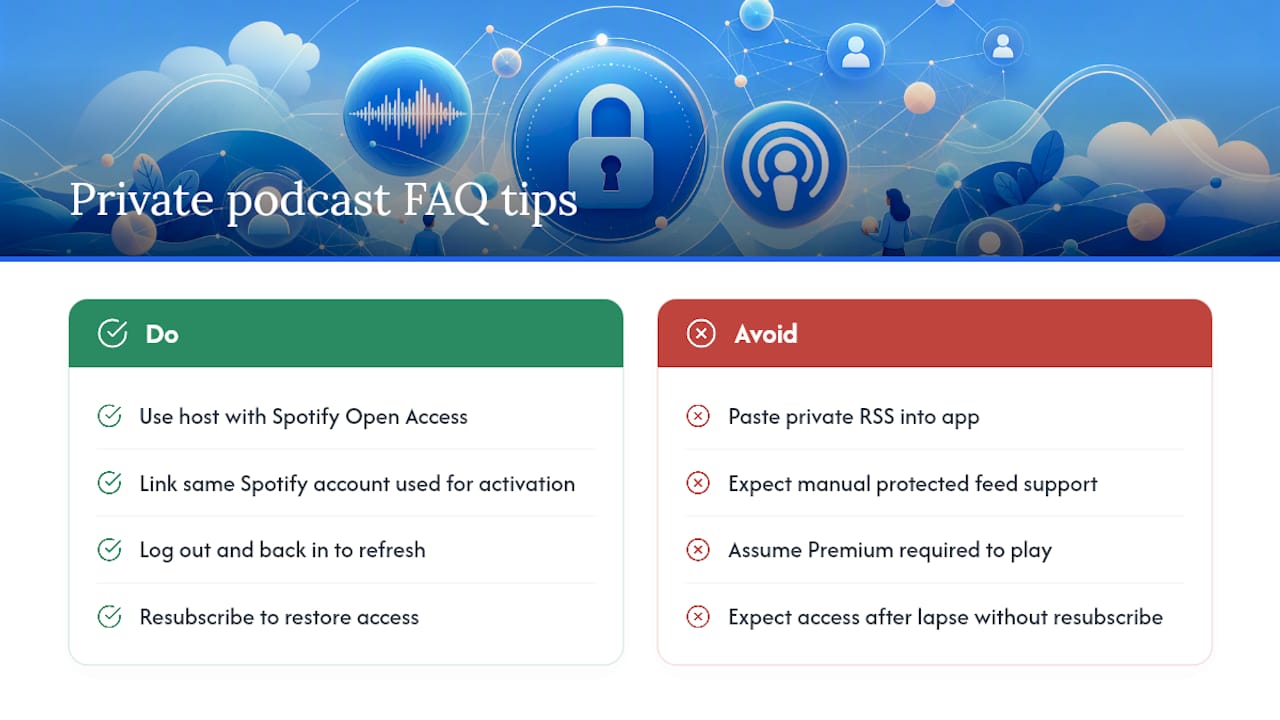
What happens to my Spotify access if I cancel my subscription? Access typically revokes automatically once the subscription lapses, and resubscribing restores it without needing a new activation code in most Open Access setups.
Sources
- Publish your private podcast on Spotify (Transistor changelog)
- How to use Spotify to Listen to Private Podcasts (Hello Audio support)