
Start tonight with three moves: pick one no-screen zone in your house, run a 60-minute tech-free hour after dinner, and swap one usual screen habit for something hands-on. That's it. That's the whole entry point to screen free family time, and you don't need a week-long plan or a pile of new toys to try it.
These three actions work because they attack the problem from different angles. A no-screen zone (the dinner table, say, or bedrooms) removes the constant negotiation over "just five more minutes" by making the boundary physical instead of verbal. A tech-free hour builds a predictable ritual kids can count on, which lowers resistance over time. And swapping in one specific alternative activity, rather than just taking something away, keeps kids from feeling punished. You're replacing a habit, not deleting one.
Here's your printable starter checklist:
- Pick one no-screen zone — the dinner table or all bedrooms are the easiest wins.
- Run a 60-minute tech-free hour tonight — right after dinner tends to work best for most families.
- Swap one screen activity for a hands-on one — a card game, a walk, or a cooking project instead of the usual tablet time.
Try it once before you try to perfect it. The rest of this guide gives you the research, the audit tool, the activity bank, and the sample schedules to build from here.
Key Takeaways
Screen free family time works best when parents replace screen habits with predictable, shared rituals instead of simply removing devices and hoping something fills the gap.
| Point | Details |
|---|---|
| Run the 15-minute audit | Track who uses which device, when, and why for one day before changing anything. |
| Try tonight's tech-free hour | Pick 60 minutes after dinner and swap in one activity from your go-to list. |
| Pick three go-to activities | Keep a short bank ready so you never face a blank "now what" moment. |
| Set one no-screen zone | The dinner table or bedrooms create low-negotiation boundaries fast. |
| Anchor a weekly ritual | A recurring Sunday activity, like a personalized superhero podcast, gives the week a fixed screen-free highlight. |
Table of Contents
- What Screen-Free Week Is and How It Works Year-Round
- Why Screen-Free Family Time Actually Matters
- A 15-Minute Audit to Find Your Real Baseline
- Screen-Free Activities Organized by Category and Age
- Sample Schedules You Can Copy Today
- Rules and Scripts That Make the Plan Stick
- Replace the Habit Loop, Don't Just Remove It
- A Parent's Note: What Worked and What Didn't
- A Ready-Made Ritual When You Don't Want to Build One From Scratch
- Frequently Asked Questions
- Sources
What Screen-Free Week Is and How It Works Year-Round
Screen-Free Week is an annual campaign, traditionally held the first week of May, that encourages families and schools to unplug from entertainment screens and reconnect through play, conversation, and shared activities. Screen-Free Week provides free organizing kits and activity lists that any family or classroom can use, whether they're participating on the official week or building their own version in October.
That flexibility is the whole point. You don't need to wait for a designated week on the calendar to borrow the idea. Some families run a modified version every Sunday. Others use it as a one-time reset after a rough stretch of too much iPad time. A single tech-free evening counts. So does a full week during spring break.
If you want a ready-made bank of ideas rather than building your own from scratch, ScreenFree.org's 101 screen-free activities project is worth bookmarking. It's organized loosely enough that you can pull five ideas for tonight or plan an entire week off it. Think of Screen-Free Week less as an event you register for and more as a template you can resize to fit your family's actual life.
Why Screen-Free Family Time Actually Matters
The benefit isn't the absence of a screen. It's what fills the space instead. Face-to-face interaction, predictable family rituals, and the quality of the activity itself matter more than the raw number of screen-free minutes you log.
That distinction comes straight from the research. Reporting tied to the ABCD study on child brain development found that the quality of engagement during screen-free time, things like shared meals and joint activities, drives more developmental benefit than simply removing a device and leaving kids to their own devices (pun intended, but the point stands). Turning off the TV doesn't automatically produce connection. You still have to show up for it.
The American Academy of Pediatrics has published guidance for years on how excessive or poorly timed media use affects children's sleep and development, and its family media planning tools at Healthychildren specifically call out bedrooms and pre-sleep hours as the highest-leverage places to intervene.
Pro Tip: If you're trying to convince a skeptical partner or grandparent that this is worth doing, lead with the sleep angle. It's the easiest benefit to see within a week, and it tends to land better than a vague appeal to "quality time."
A few things worth knowing before you start:
- Designating a physical no-screen zone tends to work better than trying to track total screen minutes across the day, because a zone creates a boundary kids can see and predict.
- Turning off screens at least an hour before bedtime is a specific, low-effort change MedlinePlus recommends, and it's one of the easiest rules to enforce consistently.
- Modeling the behavior yourself (putting your own phone away) does more to change household habits than any rule you announce out loud.
A 15-Minute Audit to Find Your Real Baseline
Before you plan anything, spend 15 minutes figuring out what your family's screen habits actually look like right now. Most parents underestimate the number and overestimate where the friction will come from. An audit fixes both problems fast.
Grab a notepad or your phone's notes app and, for one typical day, jot down who's on a screen, what device, roughly when, why, and for how long. You don't need exact numbers. A rough estimate is enough to spot patterns. Do this with your kids sitting next to you if they're old enough (age 6 and up), since narrating their own habits out loud often produces a useful "huh, I didn't realize I do that" moment on its own.
Once you've filled in a version of this for your own household, the real value shows up in the "trigger" column. That's your negotiation hotspot. If your 5-year-old always asks for the tablet during the after-school lull, that's the exact 60 minutes your tech-free hour should target, because you already know it's the moment the family needs an alternative ready to go.
Screen-Free Activities Organized by Category and Age
The activity you swap in matters more than the activity you take away. Here's a working bank organized by category, with quick age notes so you're not stuck reading a list built for the wrong kid.
Quick 10 to 20-minute activities, for the moments right after school or before dinner when boredom hits hardest:
- A round of Uno or Go Fish (works for ages 5 and up, no setup).
- A scavenger hunt with five household items you name on the spot.
- Ten minutes of "would you rather" or 20 Questions during a car ride.
- A quick dance party to two or three songs.
- Sidewalk chalk if you have a driveway.
For preschoolers, shorten the round to five minutes and make the scavenger hunt about colors instead of objects. For tweens and teens, swap "would you rather" for a harder trivia category they actually care about.
Indoor creative projects, for weekends or rainy afternoons:
- Building a blanket fort with a flashlight for reading inside it.
- A drawing challenge where everyone draws the same random word.
- Simple friendship bracelets or loom bands.
- A LEGO build with a timed challenge (tallest tower in 10 minutes).
- Writing and illustrating a three-panel comic strip.
Outdoor adventures, which double as some of the best outdoor activities for families you'll find:
- A neighborhood walk with a simple "spot five birds" goal.
- Backyard obstacle courses built from whatever's lying around.
- A bike ride to a nearby park with no destination pressure.
- Sidewalk scooter races around the block.
- Planting something in a pot, even a single herb, and checking on it daily.
Kitchen and cooking projects, especially good for kids who like a concrete result:
- Letting a 4 to 6-year-old measure and pour ingredients for pancakes.
- A "build your own" pizza or taco night with toppings laid out.
- Baking cookies from scratch and decorating them together.
- A blind taste test with three or four snacks.
Quiet and reading time, particularly useful for the pre-bedtime window:
- A shared read-aloud chapter book, even for kids who can read alone.
- Audio stories or an audio adventure as a calm alternative to a screen right before lights-out.
- A puzzle table left out for anyone to add pieces to over a few days.
Cooperative games and family challenges, good for weekends with more time:
- A family talent show with a five-minute prep window.
- Charades using movie or book titles everyone knows.
- A trivia night built around your family's own inside jokes and history.
Teen-friendly options, since older kids need a different pitch than "let's play a board game":
- Cooking a full meal together where the teen picks the menu.
- A driving lesson or errand run that turns into conversation time.
- A shared podcast episode followed by a real discussion about it.
- Teaching a younger sibling a skill (guitar chords, a card trick, a recipe).
Not every item will land with every kid. That's fine. The goal is a bank deep enough that you always have a next option when the first one flops.
Sample Schedules You Can Copy Today
Three templates, sized for different levels of commitment. Pick the one that matches how much appetite your family actually has this week, not the one that sounds most impressive.
Template A: The one-hour tech-free evening. Right after dinner, phones go in a basket by the door and the TV stays off for 60 minutes. Fill it with one activity from the quick or cooperative category above. This is the easiest template to run tonight and it's the version most families sustain long-term because it costs so little planning.
Template B: The weekend day plan, balancing active time with rest so nobody burns out by 2 PM:
| Time Block | Activity Type | Example |
|---|---|---|
| — | Outdoor active | Bike ride or park visit |
| — | Kitchen project | Bake something together |
| — | Free/quiet time | Reading, drawing, or building |
| — | Cooperative game | Board game or backyard challenge |
| 3:30–4:30 PM | Quiet wind-down | Puzzle or audio story |
Template C: A full seven-day Screen-Free Week, with a loose theme per day so it doesn't feel like the same restriction repeated seven times: Monday is Outdoor Day, Tuesday is Kitchen Day, Wednesday is Game Night, Thursday is Creative Day, Friday is Family Movie Night (yes, one exception, use it as the week's reward), Saturday is Adventure Day (a trip somewhere new), and Sunday is Quiet/Reading Day to reset before the school week.
Before any of these, run through a short prep list: snacks staged in advance, art supplies or game pieces pulled out the night before, and a backup activity ready in case the planned one falls flat within the first ten minutes. For single parents or households with long work hours, Template A is almost always the more realistic starting point. You can always scale up to B or C once the one-hour version feels normal.
Rules and Scripts That Make the Plan Stick
A rule without a script for the moment someone tests it isn't really a rule yet. Here's what to actually say and do when things get pushed on.
Start with rules simple enough to repeat without a lecture attached: no screens at the dinner table, one tech-free hour before bed, no devices charging in bedrooms overnight, and one full "low-tech" day per week if a full no-tech day feels too ambitious at first.
- When a child refuses: stay calm, restate the rule once, and offer the two alternative activities you already have ready. Don't negotiate the rule itself in the moment.
- When a parent is working late: the tech-free hour still happens with whichever parent is home. Consistency matters more than everyone participating every single night.
- Reasonable exceptions: a video call with a grandparent, a homework assignment that requires a computer, or the one designated movie night in your weekly schedule.
Two commonly searched guidelines are worth knowing, even though neither is an official AAP standard. The 30-30-30 rule suggests looking away from a screen every 30 minutes, focusing on something 30 feet away, for at least 30 seconds, mainly an eye-strain guideline you can fold into any remaining screen time your family keeps. The 3-6-9-12 rule, popularized by psychologist Sherry Turkle-adjacent parenting circles, proposes no screens before age 3, no personal devices before 6, no unsupervised internet before 9, and no social media before 12. Treat it as a rough scaffold to adapt, not a rigid law. Your 7-year-old's needs and your neighbor's 7-year-old's needs aren't identical.
Pro Tip: Post the rules somewhere visible, like on the fridge, and have every family member sign it. Kids push back less on a rule they helped agree to than one that just appeared one day.
Replace the Habit Loop, Don't Just Remove It
The single highest-leverage move in this entire plan is replacing a screen habit loop with a ritual, not deleting the loop and leaving a blank space behind. Journalist Catherine Price, in a recent NPR feature on reclaiming offline time, frames this as intentionally rebuilding "the power of fun" rather than just enforcing limits. Removing a device without something to fill the gap just creates boredom, and boredom usually wins the argument.
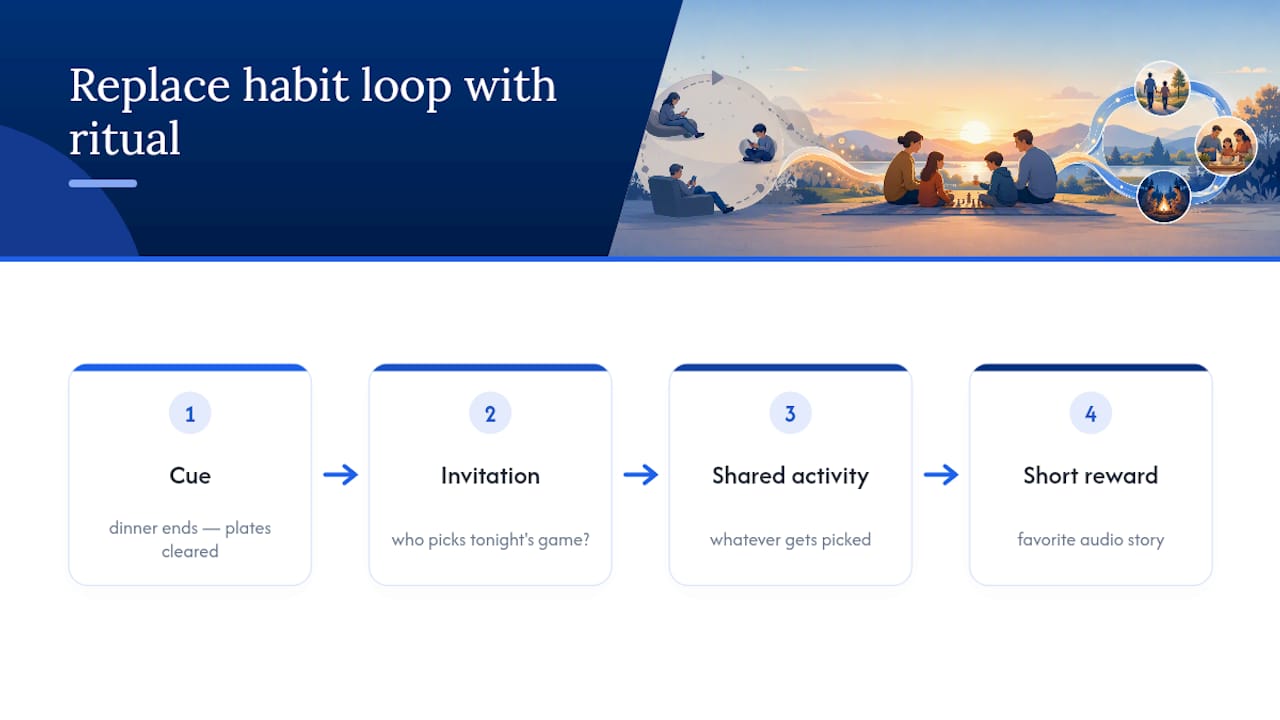
A ritual has four parts: cue (dinner ends, the plates get cleared), invitation ("who wants to pick tonight's game?"), shared activity (whatever gets picked), and short reward (a favorite audio story or extra ten minutes of a beloved activity before bed). This structure mirrors exactly the habit-loop mechanics that make screen time sticky in the first place, cue, routine, reward, except now the routine is something you chose on purpose.
Pro Tip: If your schedule is genuinely chaotic (shift work, split custody, multiple activities), anchor the ritual to something that already happens every day, like brushing teeth or the car ride home, instead of trying to protect a fixed clock time that keeps getting bumped.
A Parent's Note: What Worked and What Didn't
We tried a two-week experiment with a strict tech-free hour right after dinner, no exceptions, no negotiating. The first three nights were rough. There was whining, a fair amount of "this is boring," and one memorable meltdown over a Uno card. By day five, something shifted. The kids started asking what the activity would be before dinner was even over, which was the opposite of what we expected going in.

The tweak that made it easier wasn't a bigger rule. It was letting each kid take a turn picking the activity on a rotating basis, written on a small whiteboard by the door. Ownership mattered more than variety. A slightly repetitive game they chose beat a novel one we assigned.
Progress here beats perfection by a wide margin. Some nights still fall apart, a late work call, a genuinely awful mood, a sibling fight that derails everything in the first five minutes. That's fine. Miss a night, pick it back up the next one, and adjust the plan based on what actually happened rather than what you hoped would happen.
A Ready-Made Ritual When You Don't Want to Build One From Scratch
Everything above assumes you're building the ritual yourself: picking the game, staging the snacks, keeping a mental bank of backup activities. That works, but it also takes ongoing effort some weeks just don't have room for.

G45-hero-cast solves the "what do we do tonight" problem before it starts by delivering a new personalized superhero podcast episode to your family's private feed every Sunday, with your own child as the star of the story. It slots directly into a tech-free hour or Screen-Free Week evening as the built-in shared activity: everyone gathers, the episode plays, and the "who picks tonight" argument disappears because the ritual already has a fixed, exciting anchor point. Unlike a screen-based reward, listening together keeps eyes up and conversation going, which fits neatly with the quiet-time or bedtime-adjacent slots in the sample schedules above. Families exploring this as their weekly ritual can check the available plans and see the monthly and annual subscription options, including sibling and gift add-ons, to get a first personalized episode into their Sunday feed.
Frequently Asked Questions
What counts as screen-free family time? It's any shared activity where nobody is on a phone, tablet, TV, or computer, from a 20-minute card game to a full week following the Screen-Free Week model.
Do we have to do a full week to see benefits? No. A single 60-minute tech-free evening, done consistently, tends to build the habit faster than an occasional full week that's hard to repeat.
What's the easiest first step for a busy family? Pick one no-screen zone, like the dinner table, and run it for a week before adding anything else. Small, consistent changes stick better than ambitious overhauls.
How do I handle a teenager who resists screen-free rules? Involve them in choosing the activity and give them a role, like picking the menu for a cooking night, rather than just announcing a restriction.
Is there an official age guideline for screen use? The AAP publishes formal media guidance rather than a single number, though the informal 3-6-9-12 rule offers a rough scaffold many parents use as a starting reference point.
Sources
If you want to go deeper than this starter plan, these five sources cover the policy side, the activity side, and the research side of screen-free family time.
- Screen-Free Week | Celbrate Screen-Free Week - Any Week or May 4-10, 2026
- Pediatrics
- 7 tips for managing screen use | NIH MedlinePlus Magazine
- A fun expert's guide to enjoying life offline : NPR